Kodak EasyShare Z812 IS zoom digital camera — User's guide
Table of Contents > Taking pictures/videos > Using the Focus button
2 Taking pictures/videos
Using the Focus button
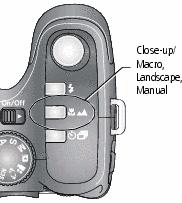
Press the Focus button  to have more control over camera focusing.

|
|
|
|
|
|||
|
2.
Press the Focus button repeatedly until the
 , ,  , or MF icon appears in the status area. , or MF icon appears in the status area. |
|||
|
3.
Take a picture.
|
|||
 button until the icon turns off.

 to view 2X magnification of the central area of focus. During magnification, press
  to adjust focal length. Digital zoom is not available in manual focus mode.
 Previous Next