Kodak EasyShare M820/M1020 digital frame — User guide
> Getting started > Setting your language
1 Getting started
Setting your language
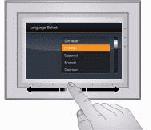
The language screen appears the first time you turn on your frame.
Using the touch border (see Using your frame's touch border):
-
Slide to find your language, then tap OK.

|
|
|
|
|
To change the language at a later time: | ||
|
|||
 (Home)
  (Settings)
 Previous Next