Kodak EasyShare M820/M1020 digital frame — User guide
> Getting started > Using your frame's touch border
1 Getting started
Using your frame's touch border
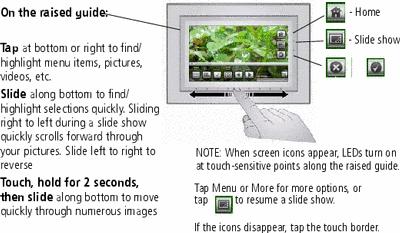
Touch along the raised guide at the bottom (tap/slide) or right (tap only) border to find/highlight menu items or pictures/videos. Press OK to select them.
| note: | The screen is not touch-sensitive. Do not touch. |

|
caution: Only use your finger to touch the border. Using sharp or metal objects may damage the border or screen. |
Previous Next