Kodak EasyShare M820/M1020 digital frame — User guide
> Getting started > Mounting your frame on the wall
1 Getting started
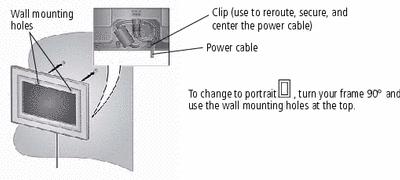
Mounting your frame on the wall
Use wall-anchoring hardware (not included) to anchor your frame securely to your wall.
Changing the frame orientation setting
Change the frame orientation setting if you change to portrait  orientation.
-
Tap
 (Home) ®
 (Settings).
 -
Select
 (Viewing options), then tap OK. Select Frame orientation, then tap OK. Select Portrait, then tap OK.
 -
Tap
 to exit.
Previous Next