Kodak EasyShare M820/M1020 digital frame — User guide
> Doing more with your frame > Playing music only
2 Doing more with your frame
Playing music only

|
|
|
|
|
1.
Tap the touch border to pause your slide show and to display the screen icons.
|
||
|
2.
Tap
 (Home), then (Home), then  (Music) to view music sources. (Music) to view music sources. |
|||
|
3.
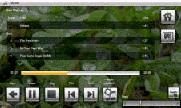
Slide to the right/left to move up/down the music source list, then tap OK.
|
|||
|
4.
Slide right/left to go to the previous/next song, or select Play all songs, then tap OK.
Your music starts playing. |
|||
|
5.
Tap
 (Slide show) to return to your picture or slide show. (Slide show) to return to your picture or slide show. |
|||
| note: | Music plays automatically when a memory card or USB device with music on it is connected. |
Notes on playing, copying, deleting music:
-
A headphone jack is available on the side of the frame (Product views).
-
Adjust the volume with the Volume button (Product views).
-
To copy or delete music files (MP3), slide to highlight the songs in the music source, then tap OK. Tap
 (Menu) ® Copy or Delete ® OK.
 -For copying, highlight the source you want to copy to, then tap OK
-For deleting, tap Yes to confirm.
Previous Next