Kodak EasyShare M820/M1020 digital frame — User guide
> Doing more with your frame > Printing pictures
2 Doing more with your frame
Printing pictures

|
|
|
|
|
1.
Make sure your frame is disconnected from the printer (Pictbridge enabled).
|
||
|
2.
On the frame, change your connection mode to Printer by tapping
 (Home) ® (Home) ®
 (Settings) ® Device configuration ® USB connection mode. (Settings) ® Device configuration ® USB connection mode. |
|||
|
3.
Turn off the frame and printer.
|
|||
|
4.
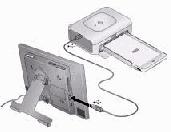
Connect the USB cable from the frame to the printer.
|
|||
|
5.
Turn on the frame and printer.
|
|||
|
6.
In slide show or single view, tap
 (Menu), then (Menu), then  (Print). (Print). In thumbnails view, see Selecting multiple pictures to print multiple pictures.
|
|||
Previous Next