Kodak EasyShare M820/M1020 digital frame — User guide
> Doing more with your frame > Copying from your computer
2 Doing more with your frame
Copying from your computer
Use the Kodak EasyShare digital display software to drag and drop pictures easily from your computer to a memory card (or other removable USB device). Insert the card into your frame and play a slide show right away (see Enjoying your pictures immediately!).
Installing the software

|
|
|
|
||
|
1.
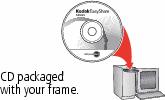
Insert the CD into your computer and follow the on-screen instructions to install the software.
Both software icons appear on your desktop. |
||||
|
2.
Double-click
 (Kodak EasyShare digital display icon) to start using the software. (Kodak EasyShare digital display icon) to start using the software. |
|||||
Using the Kodak EasyShare digital display software
The Kodak EasyShare digital display software makes it easy for your frame to communicate with other connected devices.
Copy—drag and drop your pictures, videos, and music:
-
to and from your computer to your frame via a USB cable (sold separately)
-
to and from your computer to a memory card, then insert it in your frame
-
to and from a USB-connected device
-
into a multimedia presentation that you can save to your frame
Organize—quickly create, rename, and delete files/folders on your frame
For more information on the features included in the EasyShare digital display software, click the Help button.
Previous Next