KODAK EASYSHARE Digital Frames — P730/P730m/P736
Table of Contents > Getting started > Navigating using the Quick Touch Border
1 Getting started
Navigating using the Quick Touch Border
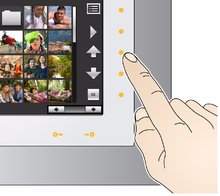
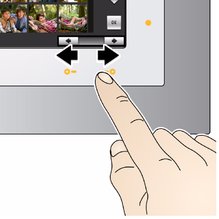
| IMPORTANT: | The display screen is not touch-sensitive. Do not touch it. Instead, tap the lights on the right and bottom borders. |


|
CAUTION: Only use your finger on the borders. Borders do not react to sharp or metal objects—and they may damage the border or screen. |
Tapping on the right border

|
|
|
|
|
|
||
|
|||
|
|||
 to move up or down through menus or rows of thumbnails.
  (see
(see Tapping and sliding on the bottom border
|
|
|
|
|
|
|
||
|
|||
|
|||
What 'tap' and 'slide' mean in this guide
Only the lights on the right and bottom Quick Touch Border are touch-sensitive. The screen and other borders are not.
In this manual, 'tap' or 'slide' means tap or slide on the light next to or under an icon or button. It does not mean 'tap the icon on the screen'.
For example: 'Tap  (Menu)' means 'Tap the light on the Quick Touch Border next to the
  (Menu) icon'.
Previous Next