KODAK EASYSHARE Digital Frame — D830/D1030
Table of Contents > Doing more with your frame > Selecting multiple pictures
3 Doing more with your frame
Selecting multiple pictures
Use the multi-select feature to copy, delete, or rotate multiple pictures at once. Or select just the pictures you want to play in a slide show.

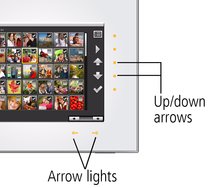
 (Menu), then tap the down arrow
  to highlight Thumbnails. Tap OK.
  to highlight Multi-Select, then tap OK.
  (Select).
  to move to the next or previous row.
  (Deselect) while the picture is highlighted.
  (Menu), then tap Select All.
  (Menu), then tap Deselect All.
  (Menu), then tap Select All, then tap Deselect All.
 Previous Next