KODAK EASYSHARE Digital Frame — D830/D1030
Table of Contents > Doing more with your frame > Accessing menu options
3 Doing more with your frame
Accessing menu options
Use the Menu button to view and work with your pictures, and to change your frame settings (Changing frame settings).
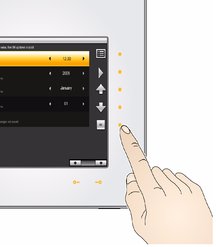
| NOTE: | As your hand approaches the frame, lights turn on indicating where to touch on the Quick Touch Borders. Tap the right border to see the screen icons. |

|
|
|
|
||
|
1.
Tap
 (Menu). (Menu). |
||||
|
2.
Tap an up/down arrow
 to highlight a menu option, then tap OK. to highlight a menu option, then tap OK.
|
|||||
| Tap OK after highlighting an option | Description |
|---|---|
|
View all available picture sources. Start here to play your pictures (Viewing your pictures). |
|
|
Slide Shows |
View and play all available multimedia slide shows (Playing a multimedia slide show on your frame). |
|
Thumbnails |
View all pictures in your current picture source as thumbnails (Viewing thumbnails). |
|
Multi-select Available from the Thumbnails menu only |
Select multiple pictures and videos for copy, rotate, delete, or play (Selecting multiple pictures). |
|
Select/Deselect All |
Select or deselect everything in your current picture source (Selecting multiple pictures). |
|
Copy |
|
|
Rotate |
See Rotating pictures. |
|
Delete |
See Deleting pictures. |
|
Settings |
Customize how you use your frame and how you view your pictures and videos. See Changing settings and more. |
Previous Next