KODAK PLAYSPORT Video Camera, Model Zx3 — User guide
Table of Contents > Doing more > Accessing the settings menu
1 Doing more
Accessing the settings menu

|
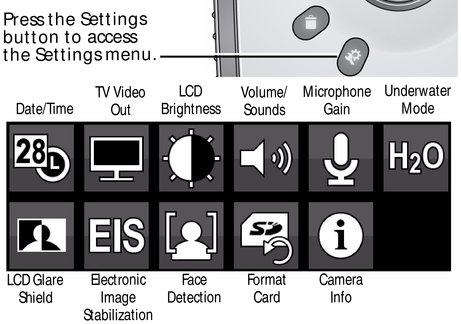
Date/Time - Set the date/time. TV Video Out - Choose the setting (NTSC, PAL) for your region. LCD Brightness - Set LCD brightness. (Auto lets the camera set it for you.) Volume/Sounds - Turn sounds on/off. (When the Video Recording light turns off.)
Microphone Gain -
Choose sensitivity of the internal microphone.
Underwater Mode -
Turn on to take videos/pictures under water.
LCD Glare Shield -
Turn on to improve LCD viewability in bright, outdoor conditions. Electronic Image Stabilization - Turn on to reduce video blur. Face Detection - Turn face detection on/off. Format Card - Erase, format the card. Camera Info - View firmware and ARCSOFT Software versions. |
Previous Next