KODAK EASYSHARE P76 Digital Frame — Extended user guide
Table of Contents > Viewing pictures > Viewing from a memory card or USB device
2 Viewing pictures
Viewing from a memory card or USB device
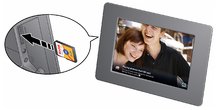
Pictures play from a memory card or USB device whenever one is inserted in the frame.

|
|
|
|
|
|
||
|
|||
Previous Next