KODAK PALMPIX Camera for the PALM m500 Handheld Series — User's Guide
Table of Contents > Using Your PALMPIX Camera > Using Your Camera
3 Using Your PALMPIX Camera
Using Your Camera
| NOTE: | The PALMPIX Camera is powered by the PALM Handheld and does not require batteries. |

|
|
|
|
|
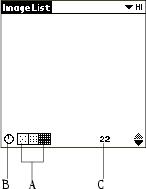
A.
Select a picture resolution
—tap the icon before you take a picture:
 320 x 240 resolution—use when you will view your pictures online, or when you need extra space for picture-taking. Each picture takes about 30K of available PALM Handheld memory. 320 x 240 resolution—use when you will view your pictures online, or when you need extra space for picture-taking. Each picture takes about 30K of available PALM Handheld memory.  640 x 480 resolution—use when you will print or e-mail your pictures. Each picture takes about 100K of available PALM Handheld memory. 640 x 480 resolution—use when you will print or e-mail your pictures. Each picture takes about 100K of available PALM Handheld memory.  800 x 600 resolution—use when you will print your pictures. Each picture takes about 160K of available PALM Handheld memory. 800 x 600 resolution—use when you will print your pictures. Each picture takes about 160K of available PALM Handheld memory. |
||
|
C.
Check pictures remaining—the Frame Counter displays approximately how many additional pictures can be stored on the PALM Handheld, based on the resolution you select.
|
|||
|
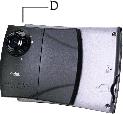
D.
Set the lens focus position—rotate the focus ring to the correct position. See Focusing the Camera.
|
||
|
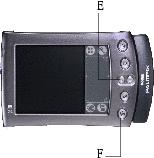
E.
Use the zoom—
press the up Zoom button (Scroll-up button) to magnify the picture up to 2x (2x is displayed on the screen). Press the Zoom button up again to zoom back to 1x. Zoom is available in 800 x 600 and 640 x 480 resolutions. If you press the Zoom button while in 320 x 240 resolution, the camera automatically resets the resolution to 640 x 480.
|
||
|
F.
Take a picture—press the Preview/Shutter button (Date Book button) once to preview the image on the screen, then press it again to take the picture. The LCD screen is your viewfinder. Tap the screen to cancel Preview.
|
|||
|
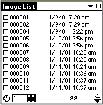
G.
Work with your pictures—tap a file name to view, rename, or delete the picture. See Selecting and Viewing Pictures.
|
||
 icon to turn the self-timer on
  . Creates a ten-second delay after you press the Shutter button.
Previous Next