KODAK PALMPIX Camera for the PALM m500 Handheld Series — User's Guide
Table of Contents > Using Your PALMPIX Camera > Focusing the Camera
3 Using Your PALMPIX Camera
Focusing the Camera
To focus the camera, turn the lens to any of the predefined focus positions.
Three focus positions are denoted by icons—Macro, Portrait and Landscape. Two focus modes are marked by indentations.
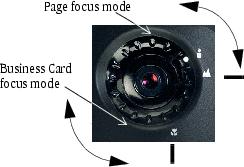
| Icon | Position/Mode | Distance |
|---|---|---|
|
|
Portrait (Mid-range) |
Use for subjects that are 2 to 12 feet (.6 to 3.6 m) away. |
|
|
Landscape (Infinity) |
Use for subjects that are over 8 feet (2.4 m) away. |
|
|
Macro (Close-up) |
Use when your subject is approximately 4 inches (10 cm) away. See Taking Close-Up Pictures. |
|
|
Page |
Use when taking a picture of an 8.5 x 11 inch or A4 size paper. See . |
|
|
Business Card |
Use when taking a picture of a business card. See Photographing a Business Card. |


Previous Next