KODAK PALMPIX Camera for the PALM m500 Handheld Series — User's Guide
Table of Contents > Working With Your Pictures > Specifying the Pictures to Transfer
4 Working With Your Pictures
Specifying the Pictures to Transfer
Only pictures included in the Upload List are transferred to the computer. When you take a picture, it is added automatically to the Upload List.
You can add or remove pictures from the Upload List before you transfer them.

|
|
|
|
||
|
1.
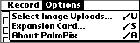
With the Image List displayed, tap Menu
 ® Options ®Select Image Uploads.
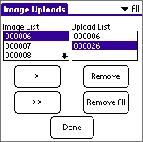
 The Image Uploads screen appears.
|
||||
|
2.
To add a picture to the Upload List, highlight it in the Image List and tap the single arrow button to add it to the Upload List.
Continue to add as many pictures to the Upload List as you want. To add all the pictures, tap the double arrow button. |
||||
|
3.
To remove a picture from the Upload List, highlight it and tap Remove.
Continue to remove as many pictures from the Upload List as you want. To remove all the pictures, tap Remove All. |
|||||
|
4.
Tap Done to return to the main Image List screen.
|
|||||
Previous Next