KODAK PALMPIX Camera for the PALM m500 Handheld Series — User's Guide
Table of Contents > Working With Your Pictures > Transferring Pictures To Your Computer
4 Working With Your Pictures
Transferring Pictures To Your Computer
The PALMPIX Image Capture Application uses PALM HOTSYNC Technology to transfer pictures from the PALM Handheld to your computer.

|
|
|
|
|
1.
Exit the PALMPIX Image Capture Application and disconnect the camera from the PALM Handheld.
|
||
|
2.
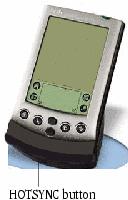
Set the PALM Handheld in the HOTSYNC cradle.
|
|||
|
3.
Press the HOTSYNC Manager button on the cradle.
All pictures in the Upload List are transferred to your computer. (See Specifying the Pictures to Transfer.) Pictures are saved in the default Save folder or in the folder you specified when customizing the HOTSYNC transfer settings. (See Customizing the HOTSYNC Transfer Settings.)
|
|||
Previous Next